 By peter_lzh
 fireworks-tech-graph: An Agent Skill That Finally Gets Architecture Diagrams Right (12 Visual Styles)
Asking AI to draw an architecture diagram is fast. Boxes, arrows, and titles appear in a flash. But zoom in and you see lines cutting through nodes, two labels crammed together, and a legend covering the business flow. After you finally straighten it out, exporting to PNG clips off the bottom. You ask it to “optimize again,” and version two just moves the mistake somewhere else.
Project Introduction
fireworks-tech-graph is an Agent Skill shared by Codex and Claude Code. It turns natural-language descriptions into geometrically validated SVG, high-resolution PNG, media-probe-verified SVG-to-GIF semantic animation, and offline interactive HTML. The focused animation path only accepts the semantic SVG produced by the generator and outputs one compact, verifiable GIF. The project ships 11 generator styles plus 1 AI hand-drawn style (Dark Luxury). Four new engineering styles, C4 review, cloud deployment, event flow, and reliability troubleshooting, provide executable semantic contracts, while keeping the AI/Agent Pattern and all 14 UML diagram types.
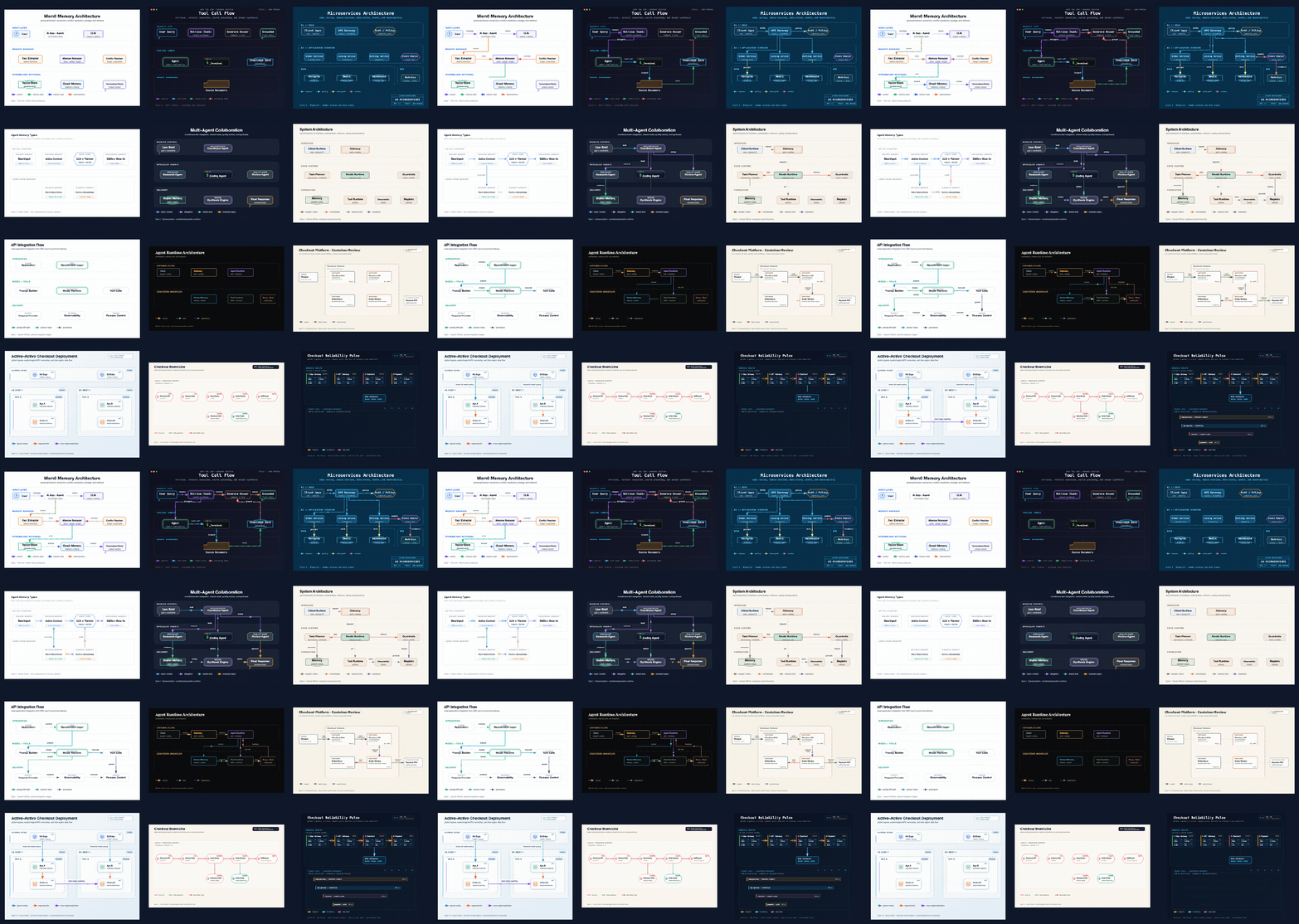
See the Effect First
You do not need to learn a drawing syntax first. You can simply say:
The Hard Part Is Not Drawing, but Knowing It Drew Correctly
Many AI drawing tools consider the job done when the model believes it is finished. fireworks-tech-graph has a stricter completion condition: there must be a validator result and actual rendering evidence.
It treats the first generated diagram as a candidate draft, then enters a round-limited feedback loop:
The first half is handed to deterministic rules. The validator checks XML structure, arrow marker references, path geometry, collisions between nodes and reserved areas, and whether lines share tracks they should not overlap. The versioned Diagram IR also blocks duplicate IDs, dangling references, illegal waypoints, and non-finite coordinates before rendering.
These checks suit machines, because “does the line pass through the box” and “does the referenced node exist” are not aesthetic questions that need a model’s gut feeling.
Then comes visual judgment. The skill truly renders the PNG, reads the image back, and checks text clipping, label collisions, whitespace, hierarchy, and whether the routing looks natural. When it finds a problem, it does not throw away the whole diagram; it only adjusts the diagnosed labels, coordinates, routing corridors, or spacing, then re-validates.
By default it runs at most two rounds of focused correction, avoiding an agent that modifies itself with no end. The final result states clearly:
If the environment genuinely cannot read images, it marks the visual review as skipped rather than declaring success without evidence.
This “Loop Engineering” approach is the clearest difference from ordinary prompt templates: generate first, then verify; use rules where rules can judge, and only then hand the invisible parts to a vision model; every change must pass the gate again.
12 Visual Styles
The project ships 11 generator-driven styles plus 1 AI-composed Dark Luxury style built from a reference spec. The first eight cover common expressions: flat icon, dark terminal, engineering blueprint, Notion minimal, glassmorphism, Claude style, OpenAI style, and Dark Luxury.
More interesting are the last four engineering styles. They change not only colors and fonts but also bake the purpose into the generation rules:
- C4 Review canvas shows only one abstraction level and requires nodes to carry responsibility, tech stack, and review status, with action and protocol written on the relationship lines.
- Cloud Fabric emphasizes Region, VPC, deployment ownership, global entry, and cross-region mechanisms, suited to cloud deployment review.
- Event Transit organizes Topic, processing nodes, Consumer Group, DLQ, and state projection into event tracks.
- Ops Pulse revolves around a fixed observation window, Golden Signals, critical request paths, and correlated traces.
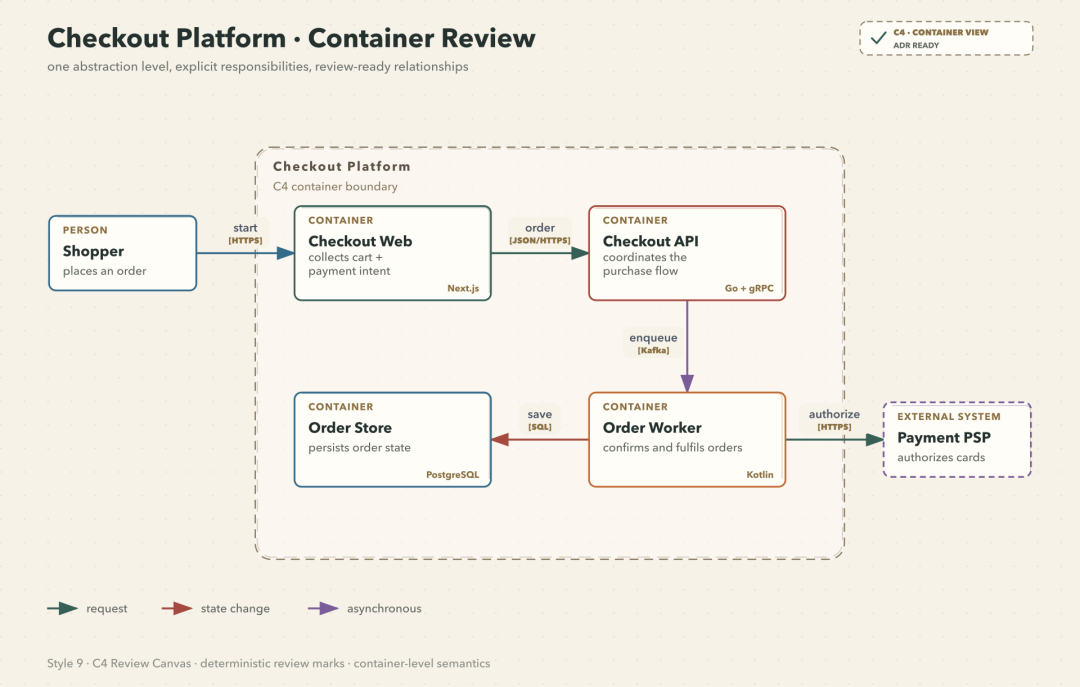
Take the C4 review canvas as an example: every container in the diagram carries responsibility and tech stack, and the lines also state action and protocol. This information can go straight into an architecture review instead of merely serving as a pretty illustration.
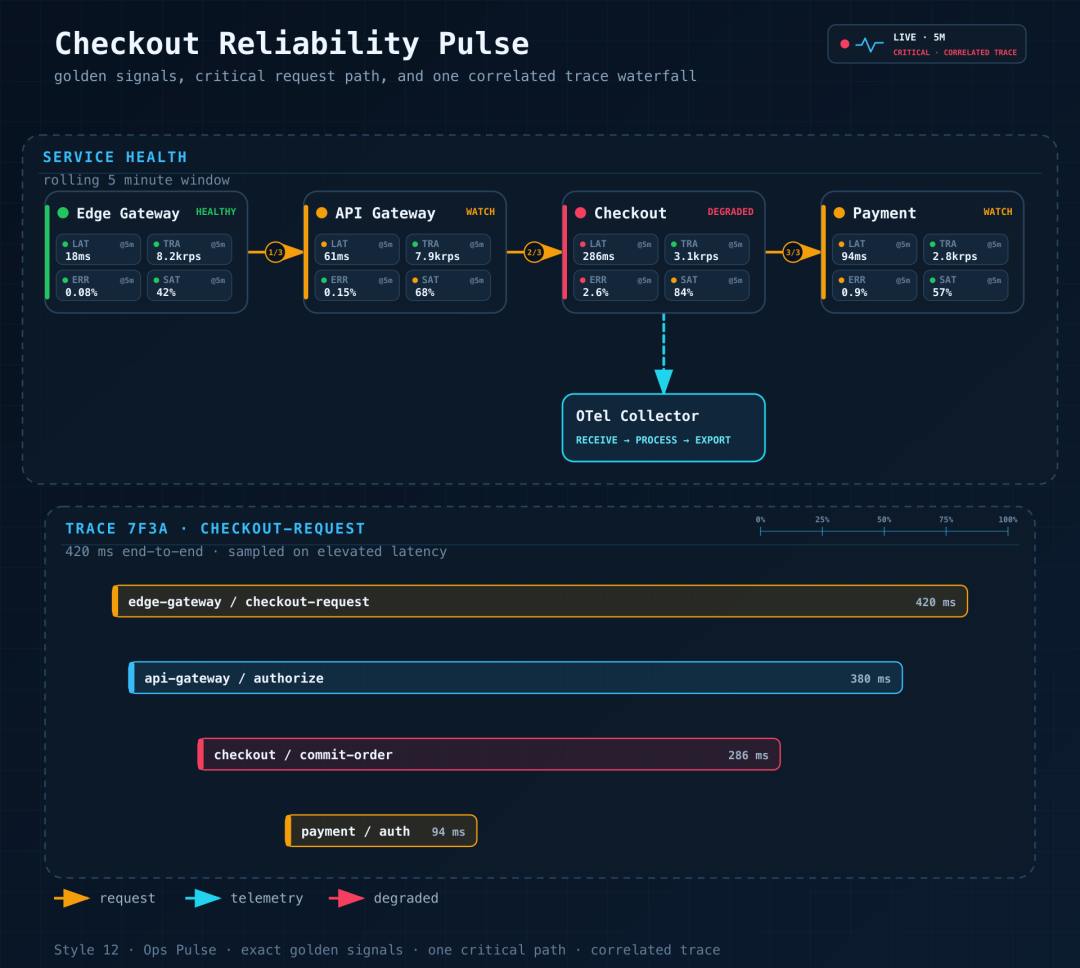
Ops Pulse puts service health, critical links, and one correlated trace on the same canvas. Its value is not the dark background but the organization that matches what you actually look at when troubleshooting.
Beyond these, the project supports 14 UML diagram types including class, component, deployment, activity, state machine, sequence, timing, and ER diagrams, and ships AI/Agent Patterns such as RAG, Agentic Search, Mem0, Multi-Agent, and Tool Call.
Quick Start
The project recommends installing into Codex and Claude Code at once via the skills CLI. The repository path must point to the real nested Skill directory. After installation, restart the corresponding client so it rediscovers the Skill, then start with natural language.
To check your local environment first, run the unified CLI diagnostic command. Generating SVG, running validation, and using the CLI require Python 3.9 or higher. PNG export also needs CairoSVG or rsvg-convert; generating GIF additionally needs FFmpeg or FFprobe, Chrome or Chromium, and puppeteer or puppeteer-core.
Ordinary users do not need to install all these dependencies upfront. Finish the basic SVG and PNG chain first to confirm the diagram types and styles fit your work, then decide whether to enable GIF and offline interactive HTML. The cost stays controllable.