 By peter_lzh
 FocuSD Island: An Open-Source “Dynamic Island” That Brings a Floating Productivity Panel to Windows
If you have used the “Dynamic Island” on a MacBook Pro, you know the feeling: system status and information sit elegantly at the top of the screen, never interrupting your work yet always a glance away. Windows users have long lacked something like this, not the cramped notification area in the taskbar’s bottom-right corner, but a truly efficiency-oriented, interactive floating panel.
A recent open-source project on GitHub, FocuSD Island, is trying to fill that gap.
What Problem It Solves
The problem has puzzled me for a long time too. We work in front of a computer with fragmented attention: open a browser to look something up, switch back to the editor to write code, jump to WeChat to reply to a message, and occasionally glance at the music player. These switches seem trivial, but over time they shred our focus.
FocuSD’s idea is simple: gather all these high-frequency action entries into a single transparent, borderless, always-on-top “floating island” at the top of the screen. It expands when needed and collapses when not, taking up zero desktop space.
What Lives Inside the “Island”
The v0.1.6 release already ships more features than I expected.
- Todos and focus mode. Add today’s todos inside the island and mark the most important one as a focus task. Content auto-archives across days as Markdown files. With “task continuation” on, unfinished tasks write into the next day automatically so nothing is lost.
- Daily notes. Capture ideas, meeting notes, and task context on the fly, forming a complete work log alongside todos. Once the save directory is configured, each day’s content is written to
YYYY-MM-DD.md, plugging directly into local-file workflows like Obsidian. - Codex status light. If you use an AI coding assistant like Codex, FocuSD captures task status through hooks, showing at a glance whether a task is running, done, failed, or waiting on you, without switching back to the terminal.
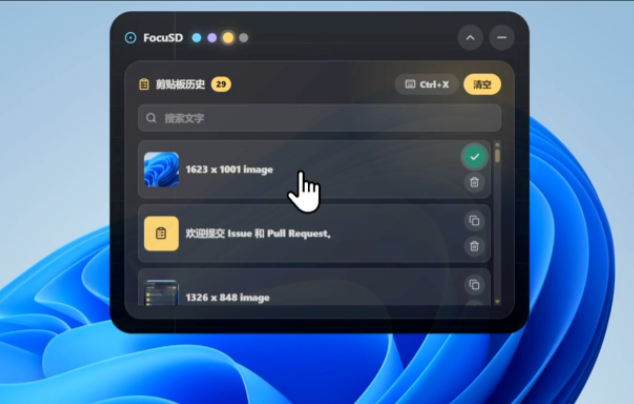
- Clipboard history. Records text and image copy history and supports favoriting frequent snippets, a feature you cannot give up once you use it.
- Media controls. View system audio state and control play, pause, and track switching without opening the music app.
- Appearance settings. Transparency, scaling, top spacing, and theme color are all adjustable, with style presets you can save.
Worth Noting: The Tech Stack
FocuSD’s stack is worth a mention. The frontend is React 19 + TypeScript + Vite 7, the desktop shell is Tauri 2, and native capabilities are implemented in Rust.
Compared with Electron, Tauri’s advantage is obvious: an installer under 10 MB, low memory use, and fast startup, exactly the right approach for a tool that always lives in the system. The Rust side handles window positioning, Win32 APIs, registry autostart, Markdown writing, and system audio, while the frontend handles only UI and interaction.
How to Get Started
FocuSD offers two paths:
- Ordinary users can go to the GitHub Releases page, download the latest
FocuSD Island_x64-setup.exe, and double-click to install. - Developers can clone the source and build it themselves; build artifacts land in
src-tauri/target/release/bundle/nsis/.
After launch, do two things first: configure the Markdown save directory in settings (point it at your Obsidian vault or another notes folder), and decide whether to enable clipboard history.
Details Worth Watching
The project is still an early MVP, but development moves fast: the first version shipped in early July and iterated to v0.1.6 by mid-July, fixing some system-freeze issues.
The Codex status-light integration requires one trust step. After installing the hooks in FocuSD, you must also review and trust the hook script named “Updating FocuSD agent status” in Codex’s settings, or the status light will not turn on. This step is clearly documented.
The roadmap has promising directions: macOS support, multi-monitor positioning, keyboard-shortcut workflows, and a data-sync solution. If those land, FocuSD’s reach widens considerably.
Final Thoughts
FocuSD Island is far from “perfect” yet, but I approve of its direction: it is not a decoration, but a way to tuck away those fragments of attention loss at the least intrusive spot on your screen. For anyone working in front of Windows daily and craving a smoother desktop experience, it is worth a try.
Open-Source Repository
GitHub: https://github.com/zzliu93-debug/FocuSD
(No open-source license has been declared yet; for commercial use, watch for future updates.)