 By peter_lzh
 30,000 Stars on GitHub! Open Notebook — The Open-Source Alternative to Google NotebookLM That Sets Your Data Free
If you’ve used Google’s NotebookLM, you remember that “wow” moment — throwing PDFs, web pages, and videos into a single workspace and having AI summarize, distill, and even generate a two-person podcast from your materials.
But if you’ve used it for real work, you’ve also run into these headaches:
- Data locked in the Google cloud — would you upload sensitive research materials?
- Tied to Gemini only — want Claude or DeepSeek? No dice.
- Accessibility issues outside the US — network hurdles to deal with.
- 50-source limit — way too small for large projects.
Today’s project solves all of these — completely.
Open Notebook: The Fully-Featured, Freedom-First NotebookLM Alternative
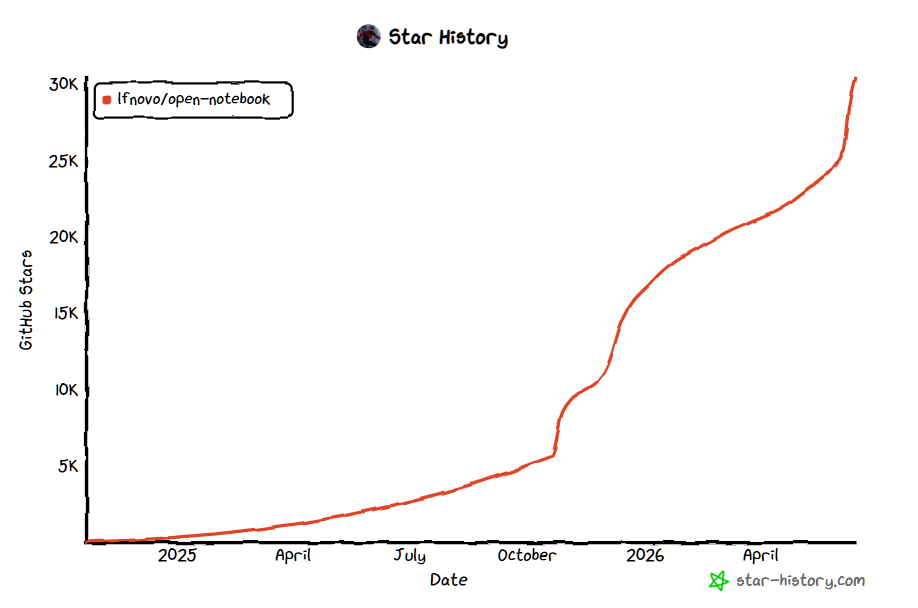
Open Notebook (GitHub: lfnovo/open-notebook) is a fully open-source replacement for Google NotebookLM. As of June 2026, it has amassed 30,600+ Stars on GitHub, with over 20,000 of those coming in the last three months alone.
Its core philosophy is simple: Your data, your rules.
The tech stack is modern: Next.js on the frontend, FastAPI on the backend, SurrealDB for storage, and a self-developed Esperanto library that unifies 18+ AI model providers. It’s licensed under MIT — use it, modify it, ship it.
What Makes It So Good?
1. 18+ AI Models — Use Whoever You Want
This is its biggest differentiator. OpenAI’s GPT-4o, Anthropic’s Claude, Google’s Gemini, DeepSeek, Mistral, Groq, and even fully local Ollama and LM Studio — all supported.
Think Claude writes better summaries today? Use Claude. Find DeepSeek-R1 sharper at reasoning tomorrow? One-click switch. No vendor lock-in. Maximum AI freedom.
Pair it with Ollama for fully offline operation — zero API costs, data never leaves your machine. For privacy-sensitive scenarios, this is a genuine necessity.
2. 1-4 Person Podcasts, Fully Customizable Characters
NotebookLM’s Deep Dive podcast is impressive, but it’s locked into a fixed two-person format with no control over content or roles.
Open Notebook takes podcast generation to a whole new level: 1 to 4 speakers, each with customizable personality, tone, and expertise. Script comes first — preview, edit, and only then generate audio. Want a three-person roundtable with a “Tech Expert + PM + End User”? No problem.
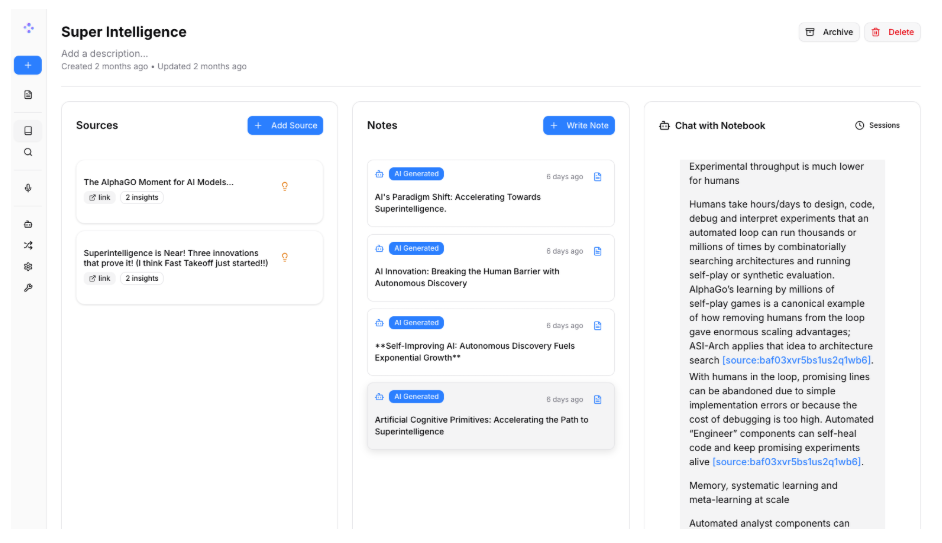
Podcast quality depends on the underlying model — with GPT-4o or Claude Sonnet, the output is impressively solid. Smaller models (7B and below) tend to loop repetitive phrases, so keep that in mind.
3. Fully Private Data — Deploy with Docker in Two Minutes
One command to start:
curl -o docker-compose.yml https://raw.githubusercontent.com/lfnovo/open-notebook/main/docker-compose.yml
docker compose up -d
Then open http://localhost:8502 — your private AI knowledge workspace is ready. All research materials, conversation history, and generated notes live in your local SurrealDB. Zero Google involvement.
4. Full REST API — Programmable Integration
Rarely seen in tools like this. Open Notebook provides a complete REST API (with Swagger docs), so you can integrate the entire “upload → AI conversation → podcast generation” pipeline as a backend service in your own products.
Open Notebook vs Google NotebookLM: 8 Out of 9 Dimensions
| Dimension | Open Notebook | Google NotebookLM |
|---|---|---|
| Data Privacy | ✅ Self-hosted | ❌ Google Cloud |
| Model Choice | ✅ 18+ providers | ❌ Gemini only |
| Podcast | ✅ 1-4 person, customizable | Fixed 2 people |
| API | ✅ Full REST API | ❌ None |
| Deployment | ✅ Local/Cloud/Docker | ❌ Cloud only |
| Source Limit | ✅ No hard cap | Max 50 |
| Cost | ✅ Only AI API costs | Free + subscription |
| Open Source | ✅ MIT License | ❌ Closed source |
| Citation Precision | Basic level | ✅ Highlight & jump |
The one area where NotebookLM still wins is citation precision — NotebookLM lets you click a citation and jump directly to the highlighted passage in the original PDF. Open Notebook’s citations are still at a basic level, but the team is actively improving this.
Who It’s For — and Who It Isn’t
Recommended for:
- Researchers, lawyers, and analysts handling sensitive materials — data can’t go to the cloud, must run locally
- Users who want fully offline AI research with Ollama — zero cost, zero privacy risk
- Content creators who want high-quality multi-role AI podcasts — far more flexible than NotebookLM
- Developers integrating AI research capabilities into their own products — REST API out of the box
Not ideal for:
- Users who just need a “PDF to Markdown” pipeline — Marker or Docling is more efficient
- Users who heavily rely on precise citations — if you need “click to jump to original position”, this isn’t there yet
- Command-line purists — the core experience is in the Web UI
Final Thoughts
Honestly, for an open-source project to reach this level of completeness — multi-model support, podcast generation, REST API, Docker one-click deploy, 7-language UI — is seriously impressive. It went from zero to 30,000 Stars in under a year, not through marketing, but by solving a real problem: people don’t want to hand over their research data to a single company, nor be locked into a single company’s models.
Want to try it? Two minutes is all it takes. If you’re handling sensitive data, pair it with Ollama for a fully local pipeline.
GitHub repository: https://github.com/lfnovo/open-notebook
Official documentation: https://www.open-notebook.ai/