 By peter_lzh
 When most RAG systems process a web page, the very first step is to parse it into plain text. It sounds natural enough, but that is exactly where the trouble starts: a web page is far more than words.
Tables, charts, layouts, formula screenshots, infographics, and the context around buttons all carry meaning. Many answers live in the visual structure itself. The moment you flatten a page into text, that structure can be lost, and no matter how smart the model is afterward, it can only reason over incomplete material.
The project featured today, PixelRAG, sets out to fix this long-ignored problem in web parsing: it lets a RAG pipeline see what a web page actually looks like.

What Is PixelRAG
PixelRAG is an open-source visual retrieval-augmented generation project from StarTrail-org, and the official code base for the paper PixelRAG: Web Screenshots Beat Text for Retrieval-Augmented Generation.
Its core idea is refreshingly direct: render web pages, PDFs, and images into screenshots, run vector retrieval at the screenshot level, and let a downstream vision-language model read the retrieved page images directly.
Since going open source, the project has gathered roughly 6.6k stars on GitHub, a sign that “don’t rush to flatten a page into text — keep its visual form for retrieval” strikes a real, long-standing pain point for many RAG developers.
It also ships a hosted search service, so you can query a pre-built index of 8.28M Wikipedia pages with no local setup and no API key required.
Key Features
Treat web pages as images. The most distinctive thing about PixelRAG is that it replaces “page parsing” with “page screenshots.” Traditional text-based RAG splits a page into text chunks, where tables, charts, and layout easily get distorted. PixelRAG instead preserves the visual form, slicing pages into screenshot tiles and running retrieval over those images.
End-to-end pipeline. This is not just a paper demo. It breaks rendering, chunking, embedding, indexing, and serving into a runnable command chain: pixelshot renders web pages or PDFs into image tiles, while pixelrag chunk, pixelrag embed, and pixelrag build-index take those tiles all the way to a FAISS index, and pixelrag serve exposes a search API.
Low barrier to try. You can test search against the official hosted Wikipedia index first, or build a local visual index over your own PDFs or document folders. For developers, that makes it much easier than a paper figure to judge whether it fits a real use case.
Built for agent scenarios. The project also offers a Claude Code plugin, letting an agent read pages via pixelshot screenshots rather than only scraping HTML. For agents that need to understand page layout, charts, and complex pages, this direction is genuinely inspiring.
Who Should Look at It
If you work on web-page question answering, enterprise knowledge bases, PDF retrieval, browser agents, or visual document understanding, PixelRAG is well worth studying.
It especially suits scenarios where “the answer isn’t only in the text”: financial-report tables, research diagrams, page layouts, tutorial screenshots, product pages, infographics, and mixed-format documents.
If your knowledge base is mostly clean Markdown or plain text, traditional RAG may already be enough. But if your material is inherently visual-heavy, PixelRAG points to a compelling alternative.
How It Works
PixelRAG can be understood as a pipeline that runs “from document to pixel index,” as shown below.
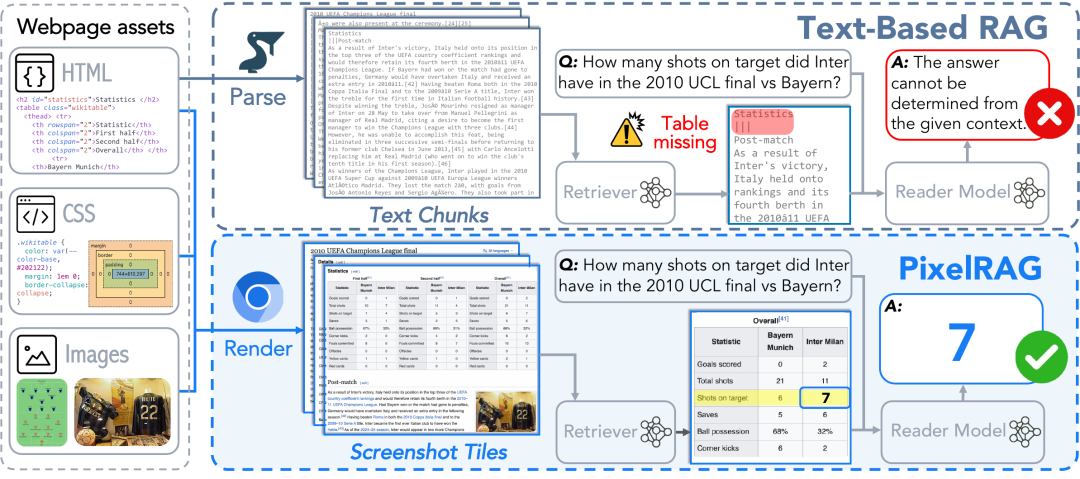
Step 1 — Render. The project uses pixelshot to render URLs, local PDFs, or images into screenshot tiles. Instead of reading HTML text directly, it lets the browser actually paint the page, then slices the visual result into retrievable image blocks.
Step 2 — Embed. These screenshot tiles enter a visual embedding stage. The project builds on Qwen3-VL-Embedding and applies LoRA fine-tuning on web-screenshot data, so that “what a page looks like” and “what a user asks” land in the same retrieval space.
Step 3 — Index. The resulting vectors are organized into a FAISS index. In the official example, pixelrag index orchestrates source, ingest, embed, and index from a local document folder; you can also split it into chunk, embed, and build-index stages.
Step 4 — Read. At query time, the system first retrieves relevant screenshot tiles, then hands those images to a vision-language model. The model sees the page fragments themselves, not text that a parser has reprocessed.
According to the paper’s abstract, PixelRAG scales to a 30M-screenshot datastore over the full Wikipedia corpus and improves on text-based RAG across several tasks, with gains of up to 18.1% over the text baseline on some benchmarks.
In short, PixelRAG doesn’t have the model read “text parsed out of a web page” — it has the model read “the visual form of the web page itself.”
How to Use It
The simplest way to install:
pip install pixelragAfter installing, you can use pixelshot to render a web page into screenshot tiles:
pixelshot https://en.wikipedia.org/wiki/Python --output ./tilesYou can also call the official hosted search API directly:
curl -X POST https://api.pixelrag.ai/search \
-H "Content-Type: application/json" \
-d '{"queries": [{"text": "What is the capital of France?"}], "n_docs": 5}'
If you want to index your own documents, install the index-related dependencies:
pip install 'pixelrag[index]'Then write a pixelrag.yaml that points to your local document path, embedding model, and output directory, and run:
pixelrag index build
pixelrag serve --index-dir ./my_index --port 30001
Note that different stages have different requirements. Screenshot rendering alone is lightweight; embedding, FAISS indexing, training, or large-scale serving pull in PyTorch, Transformers, a GPU, index files, and much larger storage.
Things to Keep in Mind
PixelRAG is imaginative, but it is not a verdict that “every RAG system should immediately be rewritten as visual retrieval.”
Visual RAG has a different cost structure: screenshots, image embeddings, index size, and VLM reading all add engineering overhead. The README’s example of downloading a pre-built FAISS index notes that a single base Wikipedia pixel index is about 217GB.
The training side raises the bar further. The project’s train/README.md is thorough, but it clearly states that reproducing the experiments requires large GPUs, dataset downloads, a vLLM reader, an OpenAI API key, and W&B, among other setup.
So the more realistic way in is to first understand its capabilities through pixelshot or the hosted API, then decide whether to bring the full pipeline into your own system.
Project Links
- GitHub: github.com/StarTrail-org/PixelRAG
- Live demo: pixelrag.ai
- Paper: arxiv.org/abs/2606.28344