 By peter_lzh
 Colibri: Run the 744B-Parameter GLM-5.2 MoE Model on a Laptop With 25GB RAM — No GPU Required
Browsing GitHub Trending a few days ago, an unfamiliar project caught my eye: colibri. The repository was only created on July 1, yet it has already rocketed to 18,000 stars. It does exactly one thing: run GLM-5.2 — a 744-billion-parameter Mixture-of-Experts (MoE) model — on an ordinary computer with just 25GB of RAM, no GPU needed.
It sounds like an overblown claim, but hands-on testing proves it: performance aside, it genuinely runs end to end.
What Is This Project?
Colibri is an inference engine built specifically for MoE large language models. It is written in pure C with zero dependencies and released under Apache 2.0. The author, JustVugg, is an independent developer whose starting hardware was a laptop with 12 cores and 25GB of RAM.
GLM-5.2 is the flagship open-source model from Z.ai, MIT-licensed, with 744B parameters. MoE architectures have a defining trait: for each generated token, the model activates only about 40 billion parameters — 5.4% of the total — while the remaining 700+ billion sit idle. Better yet, between two adjacent tokens, only about 11GB of the activated weights actually change: the experts picked by the router.
Colibri’s entire bet rests on this: the model doesn’t need to fit in memory — it just needs to be in the right place.
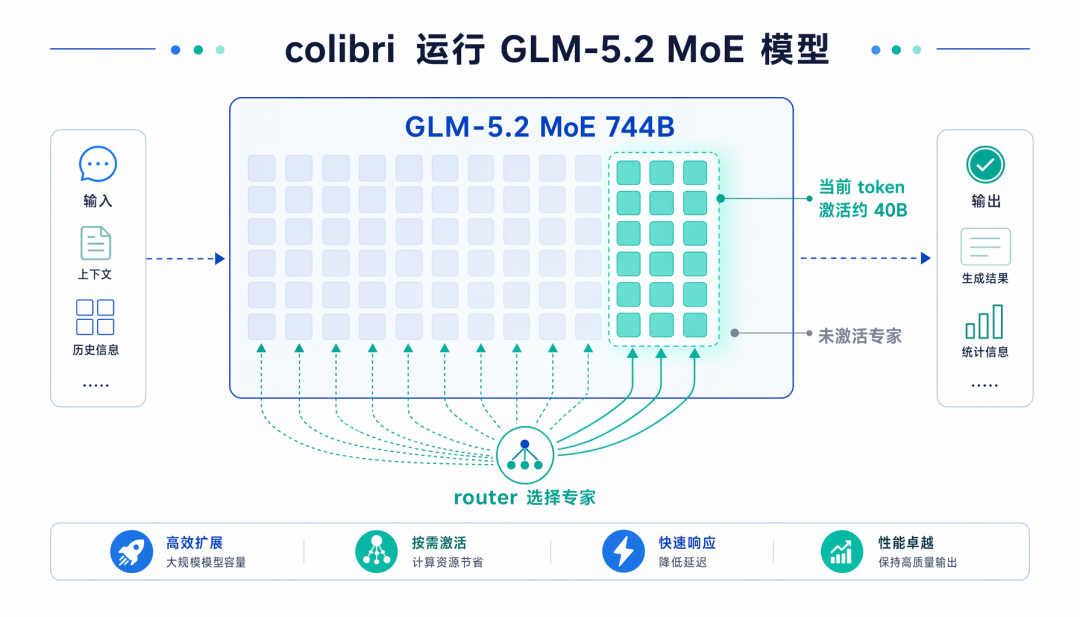
The dense portion — attention, shared experts, and embeddings, roughly 17B parameters — shrinks to about 9.9GB after int4 quantization and stays resident in memory. The 19,456 routed experts live on disk, taking up around 370GB, and are read on demand.

What Can It Do?
Using Disk as Memory — and Getting Faster Over Time
With experts on disk, the biggest fear is slow reads dragging down generation. Colibri invests heavily here.
Each expert’s three weight matrices are stored contiguously on disk, so a single pread fetches them all. The router can predict one layer ahead which experts the next layer will need — with a measured 71.6% hit rate — so the engine prefetches them while the current layer is still computing. It also maintains a learned cache of your most frequently used experts, updated every conversation round, pinning the hottest ones in memory automatically.

If you have a second SSD, you can place a mirror copy of the model on it and read from both drives simultaneously, stacking bandwidth. Official tests with a 9GB/s + 3GB/s drive combo showed expert reads 33% faster than using the fast drive alone. If the mirror drive fails or gets unplugged mid-run, the engine gracefully falls back to the primary drive without crashing.
CLI, API, and Web Dashboard Included
./coli chat starts a command-line chat session. ./coli serve spins up an OpenAI-compatible API that works with any client supporting custom OpenAI endpoints.
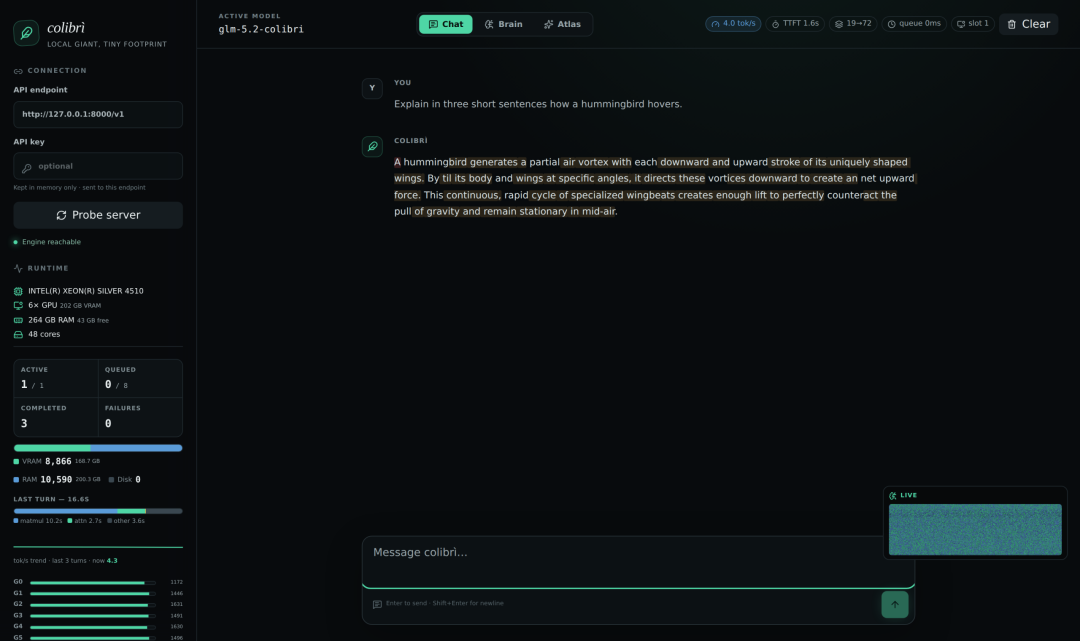
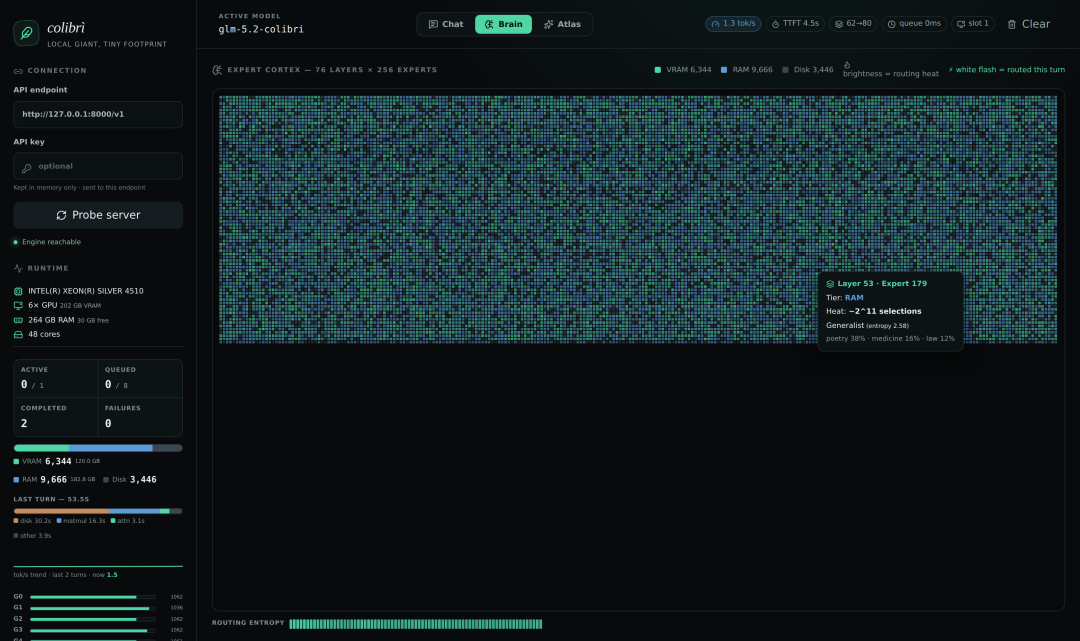
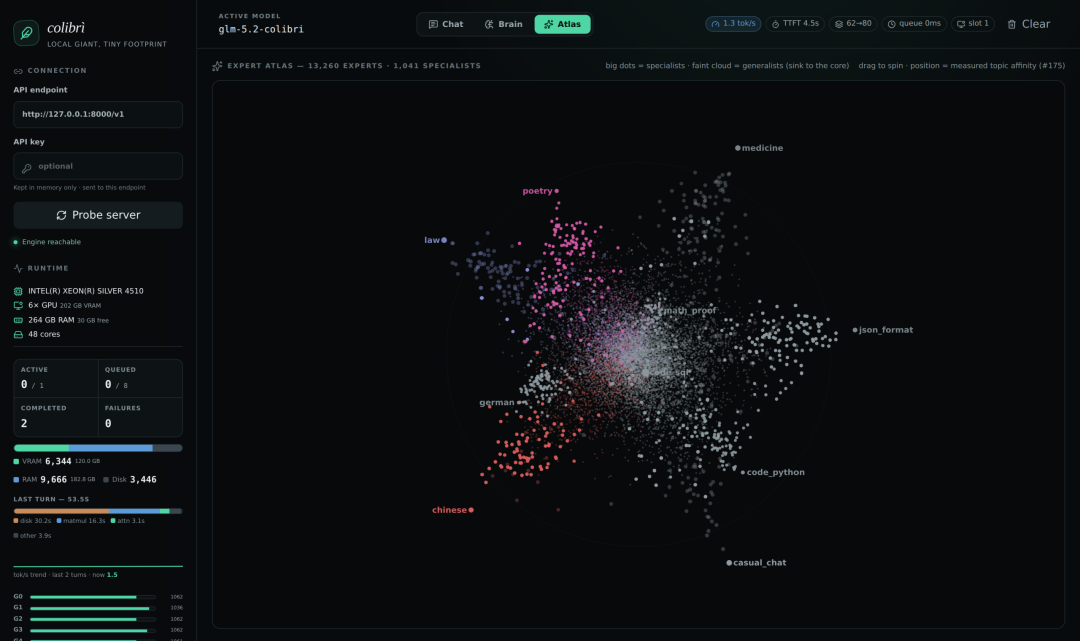
./coli web launches a web console showing real-time token speed, per-round latency breakdowns, and usage across GPU memory, RAM, and disk. It ships with two visualization pages:
- Brain: renders all 19,456 experts as a living “cortex map.” Color indicates which storage tier an expert lives in, brightness shows routing heat, and experts used in the current round flash white.
- Atlas: clusters experts by topic into a 3D galaxy — poetry, law, Chinese, and SQL each form their own clusters, and you can drag to rotate.
Reboot Your Machine, Resume the Conversation
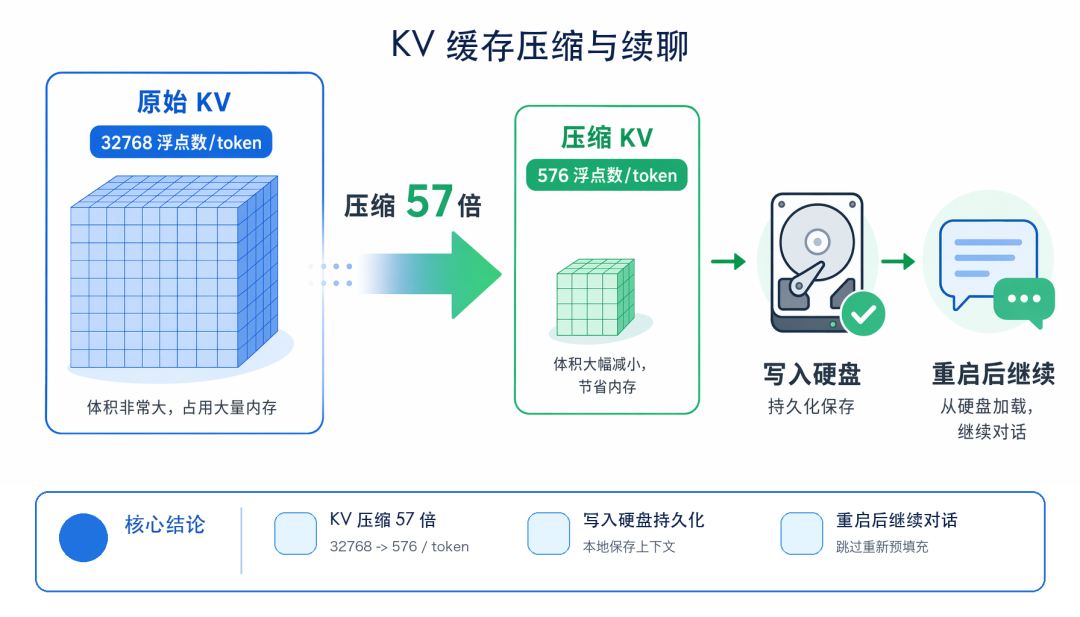
The KV cache is compressed 57x — each token stores only 576 floats instead of the original 32,768 — and the compressed cache is persisted to disk. After a reboot, you can reopen an old conversation and continue chatting without re-prefilling; the output is bit-identical to an uninterrupted session.
Speculative Decoding — With One Gotcha
GLM-5.2 ships with an MTP (multi-token prediction) head that drafts tokens ahead, letting the main model verify 2.2 to 2.8 tokens per forward pass.
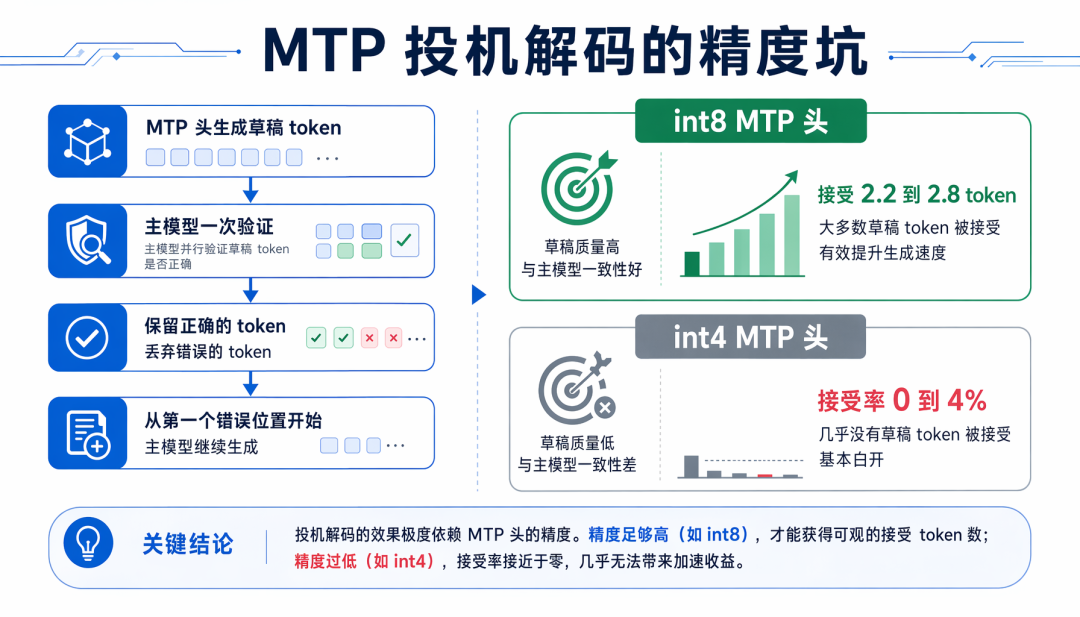
The gotcha is precision, and the author learned it the hard way: the MTP head must be int8. With an int4 draft head, the acceptance rate collapses to 0–4% — effectively useless. So when downloading the model, make sure to grab the version with the int8 MTP head (details below).
One Engine, From a 25GB Laptop to Six RTX 5090s
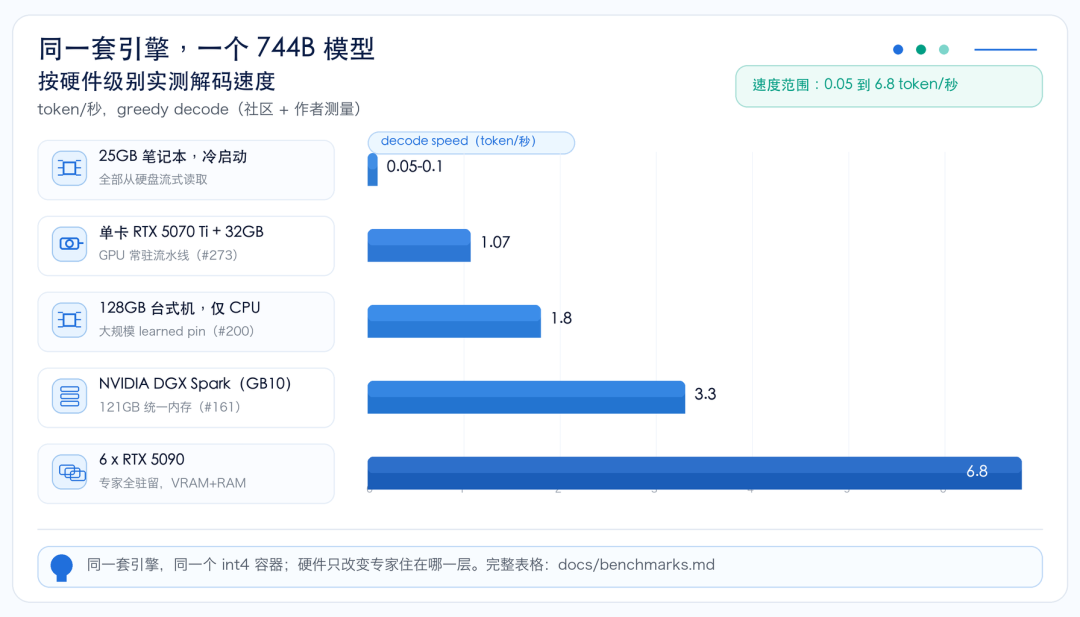
The same engine and the same int4 model file work across hardware tiers — your hardware only determines which storage tier the experts live in, not whether the model runs at all.
Benchmark numbers from the author and the community:
Quick Start
You need two things: the program (a few hundred KB) and the model (372GB).
The easy path to the program is the Releases page — prebuilt packages for Linux, macOS, and Windows, ready to use after unzipping. You just need Python 3 installed; the engine itself is pure C, and Python only handles the launcher and API gateway.
To compile it yourself, clone the repo, enter the c directory, and run ./setup.sh. You’ll need gcc or clang with OpenMP; the script checks the environment, compiles, and self-tests.
A pre-converted int4 model (~372GB) is available on Hugging Face at mateogrgic/GLM-5.2-colibri-int4-with-int8-mtp.
Again — make sure the name includes int8-mtp. The int4 MTP head in the original mirror completely breaks speculative decoding. You can also convert from the FP8 source yourself with a single ./coli convert command, which downloads and converts shard by shard, so you never need 756GB of free space at once.
On Windows, replace COLI_MODEL=... ./coli with the form python coli chat --model D:\glm52_i4 — the commands are otherwise identical.
Who Is It For?
Privacy-sensitive workloads: contracts, medical records, and internal documents you’d rather not route through third-party APIs. A 744B-class model can now process them entirely behind closed doors.
Model researchers: the Brain and Atlas pages lay MoE routing behavior bare — which expert handles poetry, which handles SQL, all from real measurements. Previously, seeing this required a GPU big enough to hold the whole model.
Hobbyists who hate per-token billing: with a 128GB-RAM machine, 1.8 tok/s is workable for batch tasks if you’re patient.
Toolchain integration: serve exposes an OpenAI-compatible endpoint, so any client with custom endpoint support can use it as a backend.
My Take
Running GLM-5.2 in 25GB of RAM is real — but at 0.05 to 0.1 tok/s, you’ll barely get a few words per minute. That configuration proves it can run; don’t expect to work with it. For daily use, start at 128GB of RAM or add GPUs. If you came for “744B on 25GB, buttery smooth,” you’ll be disappointed.
I still recommend the project, because its philosophy is genuinely admirable: when memory runs short, it gets slower — but the default policy never silently downgrades model precision or alters routing behavior, and all quantization losses are measured and published. The engineering is clean too: the engine is one C file plus a few small headers, no BLAS dependency, no Python at runtime. A solo project created on July 1 earned 18,000 stars in 24 days.
The roadmap lists upcoming support for Kimi K2, Qwen3 MoE, and MiniMax; GLM-5.2 and OLMoE already run today. Once Kimi K2 lands, I’ll grab a machine and benchmark it in a follow-up post.