 By peter_lzh
 Y2A-Auto: An Open-Source Project That Turns Video Processing and Publishing Into One Pipeline
Want to post an authorized YouTube video to AcFun or bilibili? Downloading is only the first step. Subtitles need recognition and translation, titles/descriptions/tags need reorganizing, the picture may need transcoding, and finally you log into the platform and upload.
Handling one occasionally can be done by hand; but once you need to keep following a channel, these repetitive operations quickly eat up all your time.
Turning Video Processing and Publishing Into One Pipeline
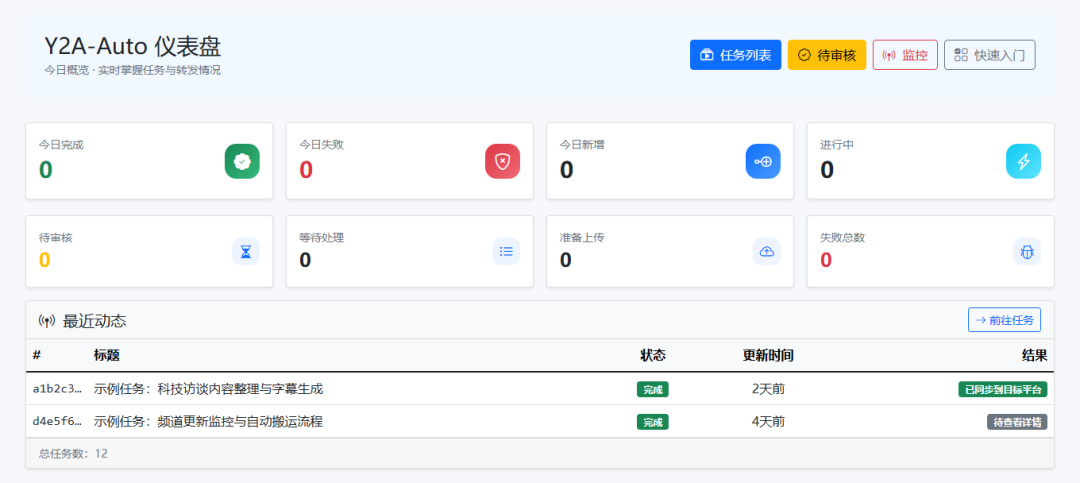
Y2A-Auto is an automation tool for YouTube, AcFun, and bilibili. It puts downloading, speech recognition, subtitle translation, metadata generation, content review, video transcoding, and platform uploading into a single web admin console.
Users can manually submit a single YouTube link, or continuously monitor new content by channel or keyword, then decide whether the system processes it automatically or routes it to manual review before publishing. The project has already earned over 2,000 stars on GitHub, showing this “consolidate scattered scripts into a manageable workflow” need is far from rare.
What Happens After a Link Enters the System
The core of Y2A-Auto is not a single downloader, but a task chain with state management. Depending on the features actually enabled, a video roughly goes through these steps:
A task manager limits the concurrency of processing and uploading, while the web page centrally shows task status, error messages, and content pending review. So even if one step fails, you know whether the problem is in download, subtitle, transcoding, or platform auth – without digging through multiple script outputs.
Automation Does Not Mean Skipping Human Judgment
Two publishing rhythms: unattended publishing is controlled by AUTO_MODE_ENABLED and is off by default. For more safety, let the system finish downloading and processing first, then go to the review page to tweak title/description/tags/category, and upload after confirmation.
Dual-platform options: tasks can target AcFun, bilibili, or both. Both support QR-code login; bilibili can also import a Cookie. Platform auth and publishing params are managed centrally in the backend.
Monitoring watches more than just channels: besides specified channels, the system can also find videos by keyword and distinguish regular videos, Shorts, and live streams. “latest” mode follows subsequent updates; “historical” mode handles existing content.
Failures stay visible: task added, completed, failed, and login events can be pushed asynchronously to WeCom, Server酱, or message-pusher. If a message send fails, it enters an SQLite retry queue, so a single network blip won’t silently drop the notification.
Subtitle Processing Is More Granular Than “One AI Call”
The project supports two speech-recognition services, Whisper and Voxtral. With VAD enabled, the system first finds valid speech segments, then does segmented recognition; if the result is poor, it falls back to other chunking or whole-segment processing.
Recognized subtitles then go through long-line splitting, punctuation normalization, filler and duplicate-word filtering, time-offset, and adjacent-gap merging. Subtitle QA first uses rules to block signature lines, noise prompts, and templated duplicate sentences, handing only borderline samples to AI for review.
A noteworthy design: when subtitle QA fails, the system skips subtitle burning, keeps the subtitle file, and continues uploading the original video while flagging the anomaly in the task result. It avoids one bad subtitle sinking the whole task, and doesn’t quietly hide the problem either.
Transcoding Auto-Degrades Based on Machine Conditions
Video processing is done by FFmpeg, using CPU or supporting NVIDIA, Intel, and AMD hardware encoding. Hardware mode first tries HEVC/H.265; if the encoder is unavailable or transcoding fails, it falls back to libx264.
On Windows without FFmpeg, the program can auto-fetch it; Docker users can map a GPU or /dev/dri by graphics-card type. This doesn’t guarantee hardware acceleration everywhere, but at least gives a clear fallback path.
Running It with Docker
The project recommends Docker deployment. Before starting, prepare the YouTube Cookie and the login Cookie for the actual publishing platform; these files contain account credentials and should not be committed to the code repo.
After the service starts, visit the admin page.
On first entry, it’s recommended to enable web login protection first, then configure platform accounts and the YouTube Cookie. You only need to additionally fill in the YouTube Data API v3 key when channel or keyword monitoring is required; AI translation, speech recognition, content review, and notification push are all enabled on demand.
Who Is It Best Suited For
If you only occasionally save a video, a standalone download tool is lighter. Y2A-Auto is better suited for people who need to continuously process authorized content, maintain multiple tasks, and want to keep a choice between automation and manual review.
What it really saves is not a single click, but the switching cost of repeatedly doing download, subtitle, transcode, info organization, and upload. At the same time, Cookies, platform accounts, AI services, and monitoring APIs all need to be configured by yourself, and external dependencies must be maintained after deployment.
Project Address
GitHub: