 By peter_lzh
 You want to sketch a mind map, so you fire up XMind. Need a flowchart? Switch to Draw.io. A quick freehand doodle? Open Excalidraw. Three tools, constant context-switching, and your train of thought derails somewhere along the way.
Honestly, it’s annoying.
Recently I stumbled upon an open-source project called Drawnix that merges all three use cases into a single whiteboard. It’s sitting at 14K stars on GitHub and is completely free under the MIT license.
After a week of using it, I think it deserves a proper look. The project has doubled from 7K stars last August to 14K now — the growth is unmistakable.
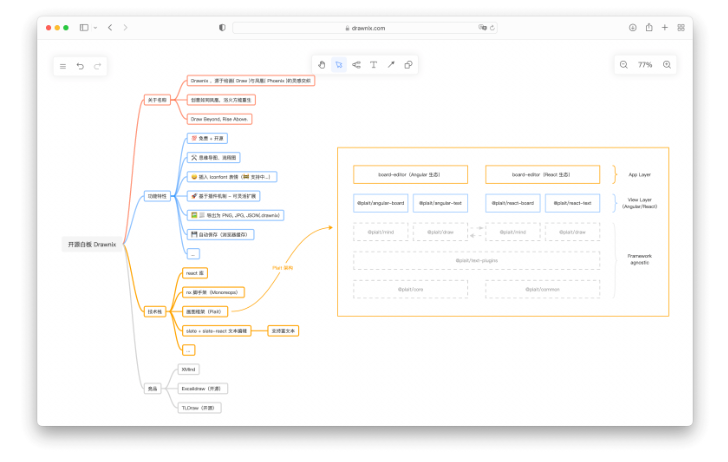
Three Tools, One Canvas
Drawnix’s core selling point is dead simple: unification.
Open it, and you get an infinite canvas. Mind map mode on the left. Flowchart mode on the right. Switch to freehand drawing anytime. No juggling three separate applications. No exporting and importing between them. Everything happens on a single page.
While outlining this very article, I built the structure as a mind map first. When I realized one section needed a flowchart to explain it clearly, I switched modes right there on the same canvas — drag, drop, done. My train of thought stayed intact.
Once you’ve experienced this, there’s no going back.
Two Killer Features: Text to Diagram, Instantly
If the three-in-one approach is Drawnix’s foundation, these two features are its superpowers.
Markdown to Mind Map in One Paste
Anyone who writes outlines knows that Markdown’s unordered lists are already structured like mind maps. Drawnix lets you paste a block of Markdown text and automatically generates the mind map. # becomes the central topic, ## becomes a primary branch, ### becomes a secondary branch.
Before, you’d drag and drop each node one by one to build a mind map. Now you write your outline, paste it in, and the diagram appears instantly.
Mermaid Syntax to Flowchart
If you’ve written technical documentation, you’ve probably used Mermaid. Drawnix has a built-in Mermaid engine — type graph TD; A-->B-->C and it renders directly into a flowchart.
This is a developer’s dream. No dragging connectors, no fiddling with alignment. Write a few lines and the chart appears. Plus, the generated diagrams remain fully editable — you can tweak them by hand afterward.
Together, these two features blur the line between “writing” and “drawing” entirely.
Built by the PingCode Team, Serious Engineering Under the Hood
Drawnix is not a hobby project. It’s built on the Plait framework, developed by PingCode (the team behind Worktile) based on their drawing capabilities from their knowledge base product.
The tech stack is TypeScript + React + Slate rich-text editor, with a plugin-based architecture. This means you can extend it with React or Angular, or integrate different rich-text frameworks.
Looking at the project structure, the code quality is solid — 88% TypeScript, monorepo managed with Nx, dev server on Vite. This is a properly engineered project, not a “good enough” side project.
Docker Deployment, One Command to Launch
Many open-source tools look great but are a nightmare to deploy. Drawnix handles this gracefully:
docker pull pubuzhixing/drawnix:latest
docker run -d --restart always --name drawnix -p 7200:80 pubuzhixing/drawnix
Two commands. Open http://your-ip:7200 in your browser and you’re up and running. Installing it on a NAS? No problem at all.
Or skip deployment entirely — the online version at drawnix.com works instantly, saving data to your browser’s cache. The interface includes six built-in themes — dark mode, starry night, and more — all polished and ready.
Who Is Drawnix for?
Honestly, Drawnix’s appeal is broad:
- Developers: Use Mermaid for architecture diagrams, Markdown for technical plans — it just clicks.
- Product Managers: Flowcharts, user journey maps, feature brain maps — one tool covers the full workflow.
- Students and Teachers: Note-taking, knowledge mapping, classroom presentations — free and effective.
- Personal Knowledge Management: Reading notes, project planning, scattered ideas — an infinite canvas to dump it all.
Compared to alternatives, Drawnix’s positioning is sharp. Excalidraw is fantastic — 107K stars, the reigning champion — but it’s pure freehand style with no mind map or flowchart modes. tldraw was an open-source standard, but it’s now pushing a commercial paid version. Drawnix merges all three, stays fully free under MIT, and supports Docker self-hosting — your data stays entirely in your hands.
Draw + Phoenix
Drawnix’s name is a nice touch: Draw + Phoenix. The idea is creative rebirth — rising from the ashes like a phoenix.
The project is iterating fast. From 7K stars in August 2025 to 14K today, it doubled in half a year. The community is active, and the developers are responsive. Version v0.4.0 dropped in April, and the Markdown-to-mind-map feature shipped with that release.
If you’re looking for a free, all-in-one, self-hostable whiteboard tool, Drawnix is worth a try. MIT license — you’ve got nothing to lose.
Project: github.com/pacexy/drawnix
Online: drawnix.com