 By peter_lzh
 Croc: The 30,000-Star Open-Source File Transfer Tool That Works Across Any Network With One Command
Ever been in this situation? You want to send a large file from your office computer to your home machine — you forgot your USB drive, WeChat caps attachments at 100MB, cloud drives make you upload first and then download (and nag you to buy a premium speed boost), and scp requires a public IP and SSH keys. It’s 2026 — why is transferring a file still this painful?
The open-source project we’re covering today may end that headache for good.
One Command for Cross-Network Transfers
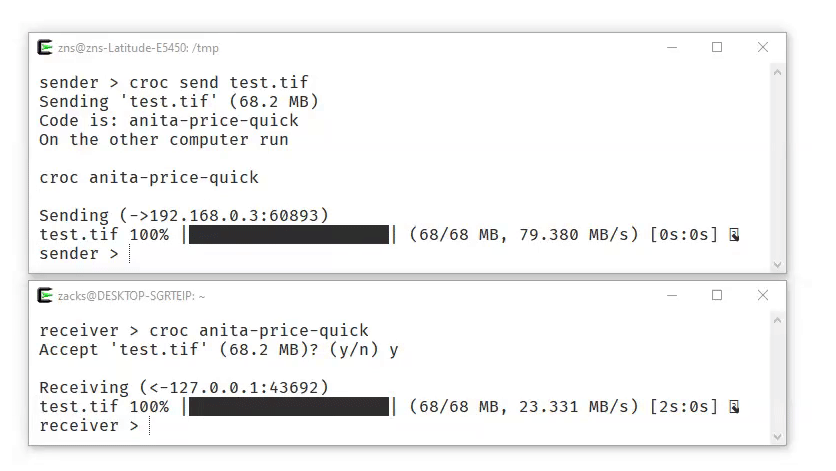
Croc is a command-line file transfer tool written in Go by independent developer Zack Schollz, and it has racked up more than 30,000 stars on GitHub. Its core workflow is almost absurdly simple: the sender runs croc send filename, and the terminal generates a three-word passphrase (something like 8lizard-blue-soup-eta). The receiver types croc 8lizard-blue-soup-eta on another computer, and the transfer begins. No account registration, no network configuration, no need to know the other party’s IP address.
This works thanks to a relay server mechanism. Both computers actively connect to a public relay node, which brokers the connection. That means whether you’re on a coffee shop’s public WiFi or behind a corporate intranet, as long as both sides have internet access, files flow freely. No port forwarding, no public IP — all the classic networking headaches simply disappear.
Your Data Stays Secure
Speaking of relays, you might wonder: my data passes through someone else’s server — is that safe?
Croc uses PAKE (Password-Authenticated Key Exchange) for end-to-end encryption. In plain terms, your file is encrypted before it ever leaves your machine. The relay server sees nothing but ciphertext from start to finish — even the server’s operator cannot read your files. The passphrase is single-use and expires immediately after the transfer completes. And because the passphrase is a combination of three random words, its entropy is far higher than an eight-digit code, making brute-force attacks practically impossible.
If you need even stronger guarantees, croc lets you run your own relay. A single croc relay command on your own server does it, and clients point to it with croc --relay your-address. Many teams run a croc relay inside the company intranet — far simpler than standing up a file server.
More Than Just Sending Files
Croc can do considerably more than basic send-and-receive. Several advanced features prove genuinely useful in practice:
Resumable transfers. If the network drops mid-transfer of a large file, just rerun the command — croc picks up exactly where it left off instead of starting over. In flaky network environments, this is a lifesaver.
Pipe support. Don’t want to create a temp file? Feed data to croc directly through a pipe. For example, to pack logs on a remote server and pull them to your local machine: ssh user@remote "tar czf - /var/log" | croc send --stdin, then receive with croc recv --stdout > logs.tar.gz. This pattern shines in scripts and CI/CD automation.
QR code transfers. Add the --qr flag when sending and the terminal renders a QR code — scan it with a phone to receive the file through the browser. Handing a file to a colleague no longer requires teaching them the command line.
It’s Not a Silver Bullet
Croc isn’t perfect, and its limitations deserve an honest mention.
By default it uses the public relay server operated by the developer. Although the data is encrypted, the relay can still see metadata such as your IP address and transfer timestamps. If that bothers you, self-hosting a relay is the way to go.
Also, croc is a pure command-line tool with no graphical interface. For mouse-first users, the learning curve is real. A third-party GUI called crocgui exists, though it isn’t officially maintained.
One more practical issue: the public relay servers are hosted overseas, so transfer speeds for users in some regions may be underwhelming. Self-hosting a relay solves this.
Final Thoughts
Compared with scp, rsync, and Magic Wormhole, croc’s biggest advantage boils down to one word: effortless. Scp needs direct connectivity and SSH configuration; rsync suits long-term syncing more than ad-hoc transfers; Magic Wormhole requires a Python environment; cloud drives demand registration plus a round trip of uploading and downloading. Croc removes all of that friction — install a single binary, then one command to send and one to receive.
At the end of the day, a tool exists to solve problems, not create new ones. Croc gets that right.
If you regularly move files between machines, give it a try. Installation is trivial: brew install croc on macOS, scoop install croc on Windows, or simply curl https://getcroc.com | bash.