 By peter_lzh
 Palmier Pro: Open-Source Mac Video Editor for Apple Silicon Crosses 10K GitHub Stars
The most time-consuming part of AI video production is rarely generating the first clip — it is the endless revisions that follow. The script lives in a chat window, the shots live on a generation platform, and editing happens on a timeline. Changing a single frame means downloading, importing, replacing, and re-aligning the rhythm all over again.
What the project is
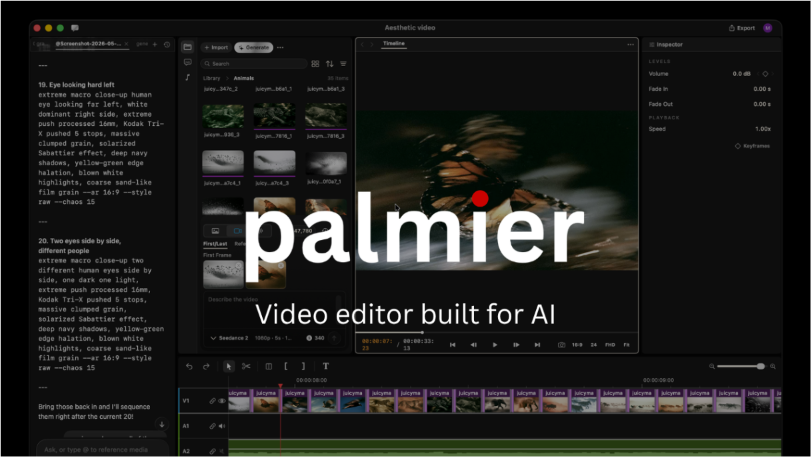
Palmier Pro wants to pull that back-and-forth into a single workspace. It is an open-source video editor built for Apple Silicon Macs: a human still makes the aesthetic calls on the timeline, while agents such as Claude, Codex, and Cursor can join the same project to help with scripting, asset generation, and editing.
Positioned as a competitor to professional editing tools like Premiere Pro, it recently surpassed 10,000 stars on GitHub. That reflects more than interest in AI image or video generation — it signals attention to a more concrete problem: how to keep constantly generated and replaced assets inside a maintainable video project.
It treats the editor as the project’s “single source of truth.” Prompts, shot versions, and editing decisions no longer have to live scattered across different web pages and chat logs; later revisions can continue along the same timeline.
Key features
Bring agents into the editing workflow. Beyond its built-in agent, Palmier Pro can connect Claude, Codex, and Cursor through MCP. Its focus is not a promised “one-click final cut,” but letting agents assist with repetitive work inside an existing project context.
Generation and editing stay connected. Image and video models such as Seedance, Kling, and Nano Banana Pro can be invoked inside the editor. Creators no longer treat generation platforms as isolated islands — generated assets flow directly into the next round of timeline adjustments.
Humans and agents each have their place. Humans control pace, visuals, and final judgment; agents are better suited to generation, organization, and repetitive operations. This division of labor is closer to real content production than “letting AI edit everything.”
How it works
The core is not a specific model but a local collaboration pipeline. When Palmier Pro launches, it exposes an HTTP MCP service on the machine; external agents collaborate with the running editor through that address.
This changes the “chat tool gives advice, human carries it over” pattern into “agents participate in production through a project interface.” The service uses a local address and does not expose editor control to the public internet.
Under the hood, SwiftUI and AppKit handle the macOS interface, AVFoundation processes video media and timelines, the MCP Swift SDK provides the agent interface, and Metal powers graphics and media processing in the plugin service. It is first and foremost a native media app, with agent capabilities embedded inside.
Who should look at it
Creators producing AI videos, product launch videos, or content prototypes can use it to explore a new way of collaborating; developers working on MCP, agent tool-calling, or desktop AI apps will find its approach to turning a visual editor into an agent’s operating environment well worth studying.
That said, it is still an early-stage project and not yet a full replacement for Premiere Pro or CapCut. Traditional editing capabilities like transitions, masks, and graphics are still being filled in; currently it supports only macOS 26 Tahoe and Apple Silicon.
How to try it
Download the DMG from the latest Release to experience the basic editor. To let Codex connect to a running Palmier Pro, you can execute the command shown in the project repository.
The editor and MCP service are open-sourced under GPLv3; generative AI processing is not open-source and requires login and a subscription.
Project links
GitHub: github.com/palmier-io/palmier-pro
Official site: palmier.io