 By peter_lzh
 5 Hidden-Gem GitHub Projects That Are Incredibly Useful
In this roundup we dig up five practical open-source projects from GitHub — from a full Mac hardware checkup tool to a lightning-fast Python linter, a video downloader, an all-in-one file toolbox, and a treasury of Claude Code recipes. Each one is genuinely handy in daily work.
01 MacCheck
As the name suggests, this project is a tool that gives your Mac a full “physical exam.” It is especially useful when buying a used Mac, inspecting a machine in-store, or running a deep self-check on your own computer.
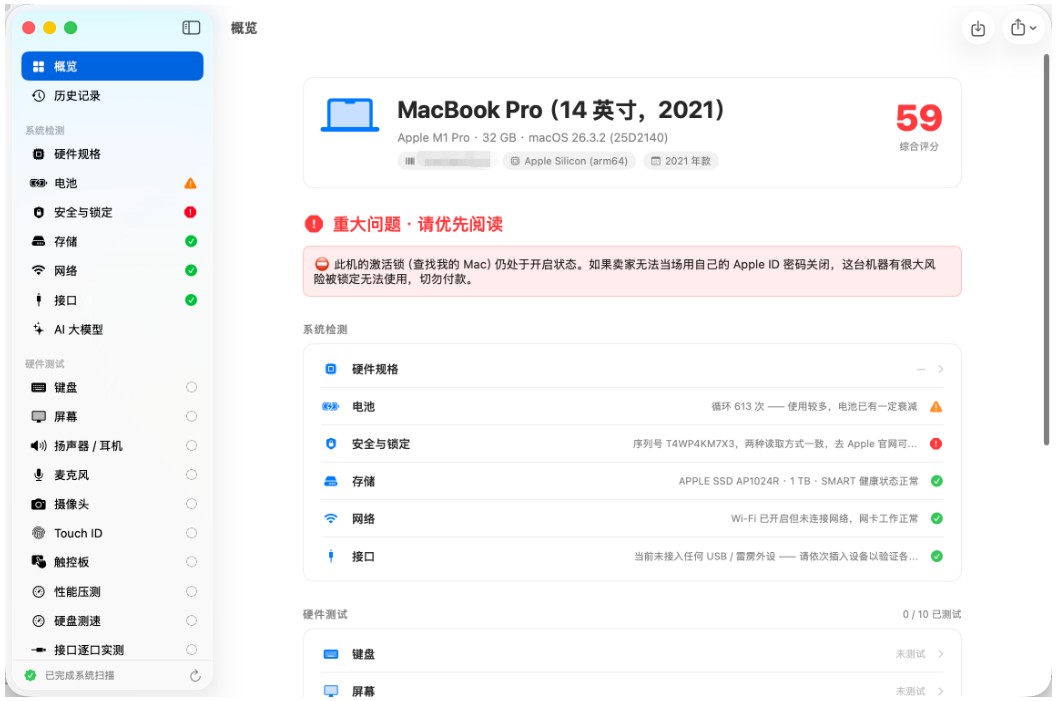
It automatically reads out key details like the model, chip, battery health, and cycle count, and flags high-risk items such as MDM locks and activation locks — the big pitfalls in used-device deals. Best of all, it includes an interactive test suite: you can light up each key on the keyboard and test the screen, camera, and trackpad to see whether the hardware actually works. When done, one click exports a PDF or long-image report for keeping and comparison. All checks run locally and your serial number is never uploaded — a thoughtful touch for privacy.

02 Ruff
Ruff truly earns its reputation as a “performance powerhouse” for Python developers. It is a Python linter and formatter written in Rust, running 10 to 100 times faster than traditional tools like Flake8 and Black — the experience is remarkable.
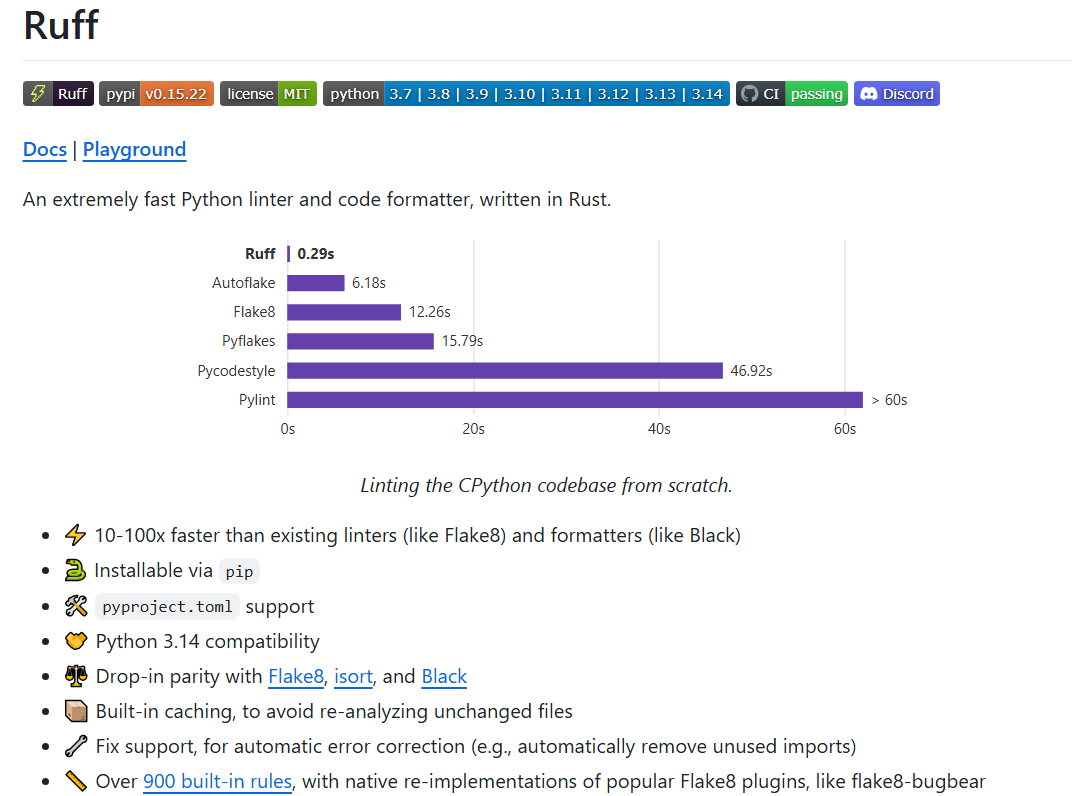
It works as an all-in-one replacement for Flake8, isort, and Black, with over 900 built-in rules and native implementations of many popular Flake8 plugins. Configuration is effortless — it supports pyproject.toml and integrates seamlessly into editors like VS Code. Top-tier projects such as FastAPI, Pandas, and Hugging Face all use it, a testament to its strength and reliability.
03 wx_channels_download
Ever seen a video you liked on WeChat Channels and wanted to save it? This project exists precisely to solve that. It is a simple, easy-to-use Channels downloader that supports both macOS and Windows.

It works by starting a local proxy service; once you open the WeChat PC client, a download button appears in the video playback interface, making it very intuitive. It even lets you choose different video qualities when downloading. While tools like this call for mindful, compliant use, it is genuinely convenient for users who want to save high-quality content.
04 FileWizard
FileWizard is like a powerful “file-processing toolbox.” Once you run it, you can handle all kinds of file-format conversions, OCR text recognition, and audio transcription right in your browser.
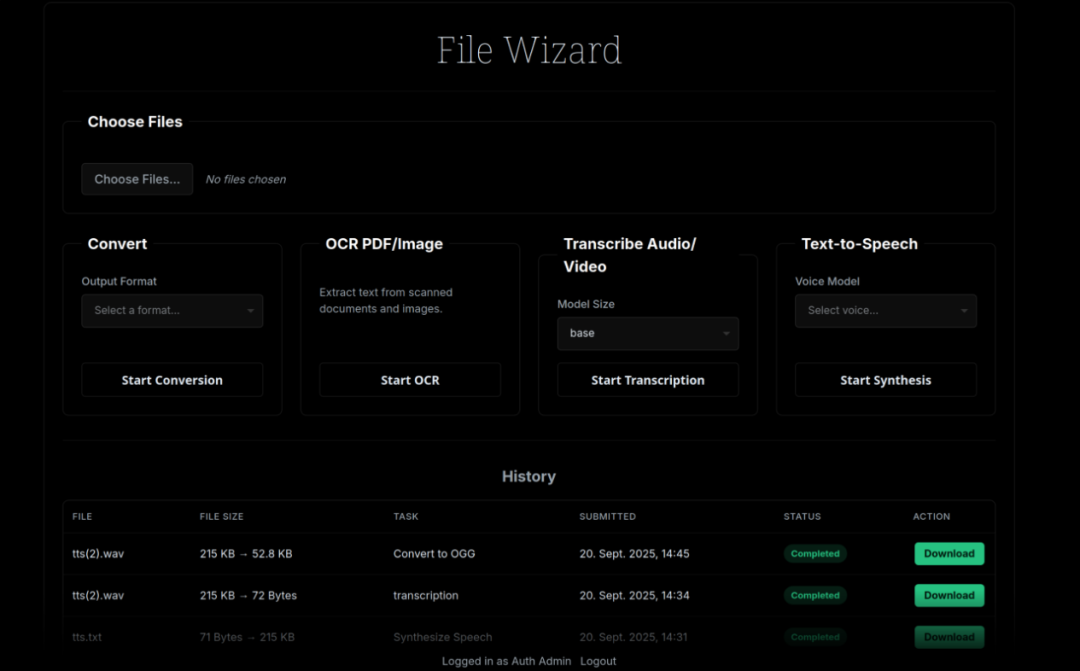
It “borrows” the power of open-source heavyweights like FFmpeg, LibreOffice, Pandoc, and ImageMagick, integrating them into a single unified interface. Whether converting office documents, processing images, or using the Whisper model to turn recordings into text, it handles it all. One-click deployment via Docker, running CPU-only by default with optional GPU acceleration — perfect for setting up a private local file-processing service.
05 claude-code-recipes
This project is essentially an “AI workflow cookbook,” collecting 100 practical prompts and step-by-step guides built specifically for Claude Code (Anthropic’s AI coding assistant).

It sorts knowledge workers’ daily tasks into 10 major categories, with matching recipes for writing weekly reports, organizing meeting minutes, doing competitor analysis, drafting OKRs, and more.

Each recipe spells out what problem it solves, how to use it, what to input, and what output to expect — very friendly for beginners. Even more interesting, it offers several “installable skills,” such as automatically turning meeting notes into an action list, pushing AI automation up another level.