 By peter_lzh
 ByteDance Seedream 5.0 Pro: An Image Model That No Longer Wants to Be Just a Toy
Don’t just judge whether it paints something pretty — whether it will actually edit an image the way you ask is the real dividing line.
It was past one in the morning when a notification scrolled by. ByteDance’s Seed team had officially released something new on July 8th — Seedream 5.0 Pro, a multimodal image-creation model (project page at seed.bytedance.com/seedream5_0_pro).
I almost didn’t take it seriously. You see three or four “we’ve upgraded again” headlines a week. But two lines into the capability summary, I stopped. This time the pitch wasn’t “it paints better” — it was two things: getting text right and editing images accurately. Those happen to be the exact places every image model of the past three years has driven people up the wall. And this might be a bit more consequential than it looks on the surface.
What the media is reporting
Let’s start with what everyone can see. In its announcement, ByteDance laid out four headline capabilities: complex information visualization, interactive precise editing, realistic photographic and portrait texture, and native multilingual input and generation.
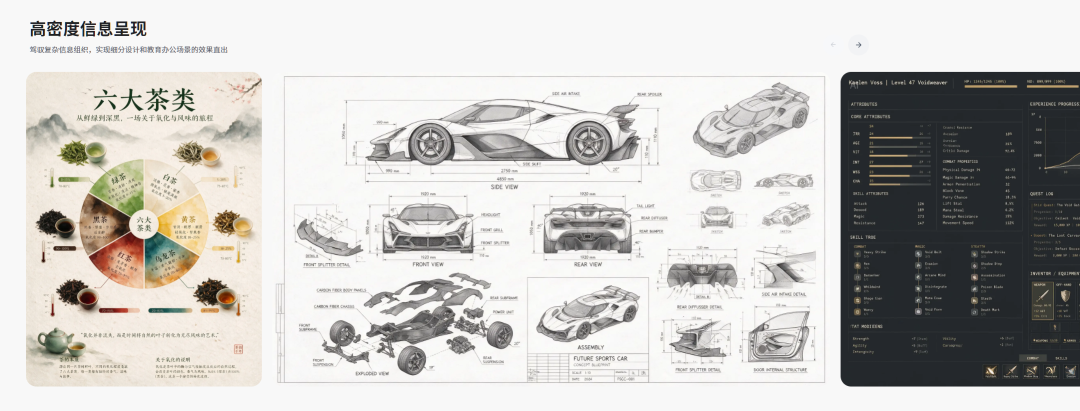
The fundamentals got a mention too: text-image alignment, structural coherence, text rendering, and visual aesthetics all improved a notch. It looks like a standard version bump, and the reactions were predictable — “domestic models are catching up again,” “ByteDance really grinds,” “when can I use it for free?”
I get that reaction. But honestly, every time I see the words “comprehensive upgrade” I sigh half a breath first — the last “comprehensive upgrade” still botched my marketing graphics twice. There’s a blind spot here: everyone is discussing “the image quality is stronger,” and no one is seriously talking about “is it controllable.” Image quality is icing. Control is the line between whether you can actually get work done. Think back to the last time you used an AI image generator — what stopped you, really? That it wasn’t “pretty enough”? Or that getting one usable result was such a slog?
The two real things I noticed
First, “getting text right.” If you’ve used AI image generators, you know how disastrous it is to ask for a single line of text. Poster slogans come out as gibberish; menu items read like alien script. That’s not a joke — I made an event poster recently and regenerated it eleven times just to get the title text correct.
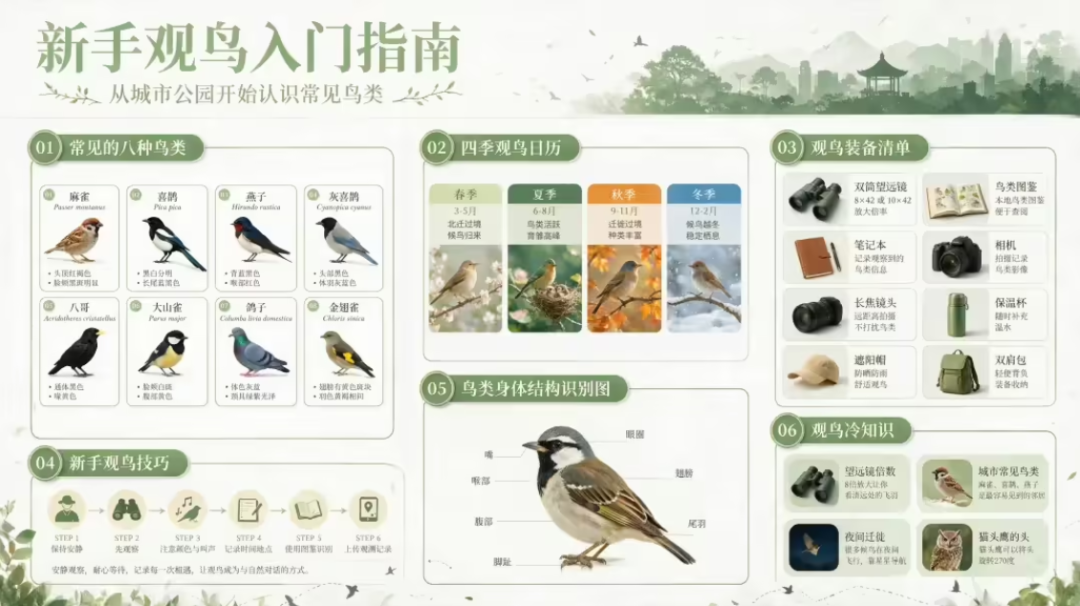
Seedream 5.0 Pro pulls “complex information visualization” out as its own capability — meaning it turns data, concepts, and dense text directly into professionally laid-out infographics. ByteDance’s own example is telling: generate a “Beginner’s Guide to Birdwatching” with fresh colors and a grid layout, listing eight common birds with scientific illustrations, Chinese and English names, and identifying features.
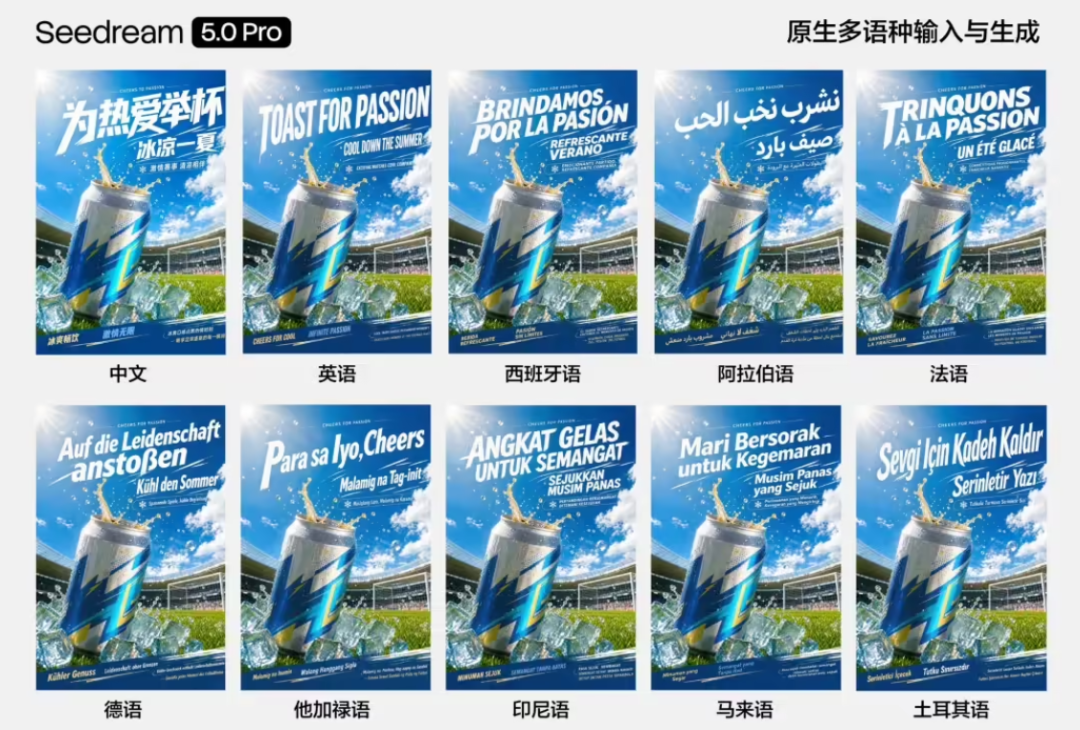
The target here isn’t “pretty.” It’s “I need a publishable image right now.” It also supports input and rendering in more than a dozen commonly used world languages — easy to overlook, but for anyone making overseas content or foreign-language materials, that’s far more practical than a few extra filters.
Second, “editing images accurately” — and this one I find fiercer. In plain terms: built on an understanding of spatial position and regional semantics, it supports point selection, lasso selection, sketch rendering, color and material replacement, layer separation, and multi-image fusion. Translated: you no longer have to write an incantation and pull a card blind. You point at a cup in the image and say “change this color,” and it changes. You circle a region and say “repaint here,” and it only touches that patch. What does that resemble? Not a text-to-image tool anymore — more like Photoshop that grew an AI.
Using image models used to feel exactly like gacha (yes, loot-box pulls). You’d craft a prompt, silently chant “give me a good one,” and — snap — one comes out, wrong, pull again; a ten-pull guarantees one usable result. Seedream’s direction is to turn “gacha” into “editing” — and that difference matters ten times more than a few extra style templates.
What comes next
Where is it now? It’s already live in the Volcano Ark experience center, with Doubao and Jimeng to be connected in turn. That rollout path itself says a lot. Volcano Ark is the B2B entry — for developers and enterprises calling the API. Doubao is the consumer chat entry; Jimeng is a dedicated creation app. One model, covering the B2B, consumer, and creator ends all at once. What ByteDance is doing is clear: weld image capability into every one of its products.
In the short term, people who run WeChat accounts, product managers, and anyone who makes slides daily now have a decent new option. Complex infographics and poster art — work that used to require a designer — you might be able to knock out yourself. In the long term, I have just one call, with maybe 60–70% confidence: competition among image models is shifting from “who paints prettiest” to “who is most usable.” Whoever first fills the gap between “generation” and “delivery” will capture this productivity wave. But I’m not sure. Really not sure.